Build an AI Reddit Reply Bot
Set up automated subreddit monitoring with keyword alerts delivered to Slack, then reply to any post with a single emoji reaction -- your bot generates and posts a helpful, on-brand comment to Reddit in seconds.


Workflow Description
Most B2B marketers know Reddit is a goldmine for reaching potential customers mid-research. The problem is nobody has time to sit on Reddit all day refreshing subreddits, hoping to catch a relevant post before it goes stale.
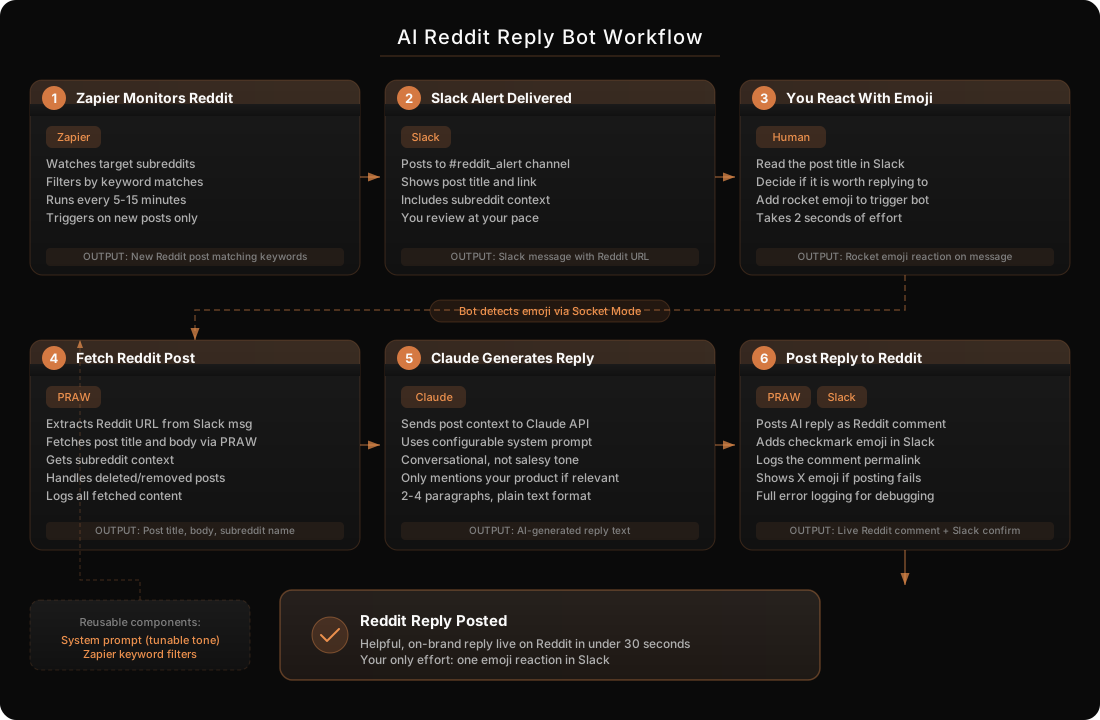
This workflow builds a complete system that monitors any number of subreddits for keyword matches, delivers alerts to a Slack channel, and lets you trigger an AI-generated reply with a single emoji reaction. Zapier watches the subreddits and filters by your keywords. When a match hits, it posts the link to your #reddit_alert Slack channel. You glance at the post, and if it is worth responding to, you add a rocket emoji. A Python bot running on your machine detects the reaction via Slack Socket Mode, fetches the full Reddit post via PRAW, sends it to the Claude API with a configurable system prompt that captures your brand voice, and posts the generated reply as a comment on Reddit. A checkmark emoji appears in Slack to confirm success.
The whole loop — from emoji to live Reddit comment — takes under 30 seconds. You stay in control (you choose which posts to reply to), the AI handles the writing, and your brand shows up in relevant conversations at scale.
Before You Begin
Tools You’ll Need Open
- Claude Code (Terminal / IDE) — builds the bot for you
- Slack workspace with admin access — for creating the bot app
- Zapier account — for Reddit monitoring (free tier works)
- A browser — for Reddit API app registration and Zapier setup
What You’ll Need Before Starting
- Python 3.10+ installed on your machine
- A Slack workspace where you can create a bot app and get tokens
- A Reddit account with enough karma to comment in your target subreddits
- Reddit API credentials — you’ll register a “script” type app at reddit.com/prefs/apps
- An Anthropic API key for Claude
- A list of subreddits and keywords you want to monitor (e.g., r/SaaS + “content repurposing”)
How It Works
Prerequisites and Costs
- Python 3.10+ (free) - runtime for the reply bot
- PRAW (free) - Python Reddit API wrapper for fetching posts and posting comments
- Slack Bolt (free) - handles real-time Slack events via Socket Mode
- Anthropic Python SDK (free) - sends posts to Claude for reply generation
- Zapier (free tier) - monitors subreddits for keyword matches, 100 tasks/month on free plan
- Reddit API (free) - script-type app for reading posts and posting comments
- macOS launchd (free) - keeps the bot running in the background
- Total: $0/month on the free Zapier tier (upgrade to Starter for higher volume)
Build Instructions
Step 1: Register a Reddit API App
Why This Matters
The bot needs Reddit API credentials to fetch post content and submit comments. Reddit uses OAuth2, and a “script” type app is the simplest path — it authenticates directly with your username and password, no redirect flow needed.
What To Do
1. Go to reddit.com/prefs/apps and scroll to the bottom
2. Click “create another app…”
3. Fill in the form:
- Name: Something like “AI Reply Bot”
- Type: Select “script”
- Redirect URI:
http://localhost:8080(required but not used for script apps)
4. Click Create app
5. Note two values:
- Client ID — the string under your app name (looks like
a1b2c3d4e5f6g7) - Client secret — labeled “secret”
Expected Output
A registered Reddit app with a client ID and secret. You’ll also need your Reddit account username and password for the config file.
Step 2: Create the Slack Bot
Why This Matters
The bot needs to receive real-time events (emoji reactions) from Slack. This requires Socket Mode — a WebSocket connection that works behind firewalls without needing a public URL. The bot also needs permissions to read messages, detect reactions, and add confirmation reactions.
What To Do
1. Go to api.slack.com/apps and create a new app “From scratch”
2. Name it “Reddit Responder” and select your workspace
3. Go to Socket Mode and enable it. Generate an App-Level Token with the connections:write scope. Copy the xapp-... token.
4. Go to Event Subscriptions and enable events. Subscribe to bot events:
reaction_added
5. Go to OAuth & Permissions and add these Bot Token Scopes:
reactions:read— receive reaction eventschannels:history— read message contentreactions:write— add confirmation reactions
6. Click Install to Workspace and authorize. Copy the xoxb-... Bot Token.
7. Create a Slack channel called #reddit_alert and invite the bot: /invite @Reddit Responder
Expected Output
Three tokens: an App-Level Token (xapp-...), a Bot Token (xoxb-...), and a #reddit_alert channel with the bot invited.
Step 3: Set Up Zapier Reddit Monitoring
Why This Matters
Zapier handles the subreddit monitoring so your bot does not need to poll Reddit constantly. It watches for new posts matching your keywords and forwards them to Slack. This is the “eyes” of your system.
What To Do
1. Go to zapier.com and create a new Zap
2. Set the Trigger:
- App: Reddit
- Event: New Post in Subreddit
- Connect your Reddit account
- Subreddit: enter your target (e.g.,
SaaS,startups,marketing)
3. Add a Filter step (optional but recommended):
- Only continue if the post title or body contains your keywords
- Example: “content repurposing” OR “repurpose content” OR “content marketing tool”
4. Set the Action:
- App: Slack
- Event: Send Channel Message
- Channel:
#reddit_alert - Message text:
"{{Title}}"

Link: {{URL}}

Subreddit: r/{{Subreddit}}
5. Turn on the Zap
Expected Output
New Reddit posts matching your keywords automatically appear in #reddit_alert with the post title, link, and subreddit name.
Step 4: Tell Claude Code to Build the Bot
Why This Matters
Instead of writing the bot by hand, you give Claude Code a detailed prompt and it builds the entire Python service — Slack event handling, Reddit fetching, AI reply generation, and error handling with emoji feedback.
What To Do
1. Open Claude Code in a new project directory and paste this prompt:
Build a Python bot that listens for Slack emoji reactions and
auto-replies to Reddit posts using the Claude API.

Requirements:
- Uses Slack Bolt with Socket Mode (no public URL needed)
- Listens for reaction_added events on a configurable channel
- Only triggers on a specific emoji (default: rocket)
- Extracts Reddit URL from the Slack message text using regex
- Fetches the Reddit post title, body, and subreddit via PRAW
- Sends the post to Claude API with a configurable system prompt
- Posts the generated reply as a Reddit comment via PRAW
- Adds a checkmark emoji on success, X on failure, question mark
  if no Reddit URL found
- Loads all credentials from a config.json file
- Logs everything to a log file with timestamps

Config file should include:
- slack_bot_token (xoxb-)
- slack_app_token (xapp-)
- reddit_client_id
- reddit_client_secret
- reddit_username
- reddit_password
- anthropic_api_key
- trigger_emoji (default: rocket)
- reddit_alert_channel (default: reddit_alert)
- ai_system_prompt (customizable brand voice)

Here are my credentials: [paste your tokens]
2. Claude Code will create the project:
reddit_responder/
-- reddit_responder.py    # Main bot (event handler + all logic)
-- config.json            # Your credentials and settings
-- config.example.json    # Template for sharing
-- requirements.txt       # Python dependencies
3. Fill in your config.json with the tokens from Steps 1-2 and your Anthropic API key.
4. Customize the ai_system_prompt in your config to match your brand voice. Example:
You are a helpful community member on Reddit. You work at a
company called [YourCompany] that does [what you do]. Write a
genuinely helpful reply to this Reddit post. Be conversational,
not salesy. Only mention [YourCompany] if directly relevant and
helpful. Keep it concise (2-4 paragraphs max). Do not use
markdown formatting.
Expected Output
A working Python bot with all the logic in a single script, ready to run.
Step 5: Test the Full Pipeline
Why This Matters
You need to verify the complete chain works before running it in production. One broken link (wrong token, missing bot permissions, insufficient Reddit karma) and the whole thing silently fails.
What To Do
1. Install dependencies and start the bot:
cd reddit_responder
pip install slack_bolt slack_sdk praw anthropic
python reddit_responder.py
2. Go to #reddit_alert in Slack and manually post a test message with a Reddit link:
"Test post for bot"

Link: https://www.reddit.com/r/test/comments/abc123/test_post/
3. Add the rocket emoji to that message
4. Watch the terminal output. You should see:
- “Trigger emoji detected…”
- “Found Reddit URL: …”
- “Fetched post: r/test — …”
- “Generated reply (X chars)…”
- “Posted Reddit comment: …”
- “Done — reply posted and confirmed with checkmark”
5. Check Slack — a checkmark emoji should appear on the message
6. Check Reddit — your reply should be live on the post
Expected Output
A complete round-trip: emoji in Slack leads to a live Reddit comment, confirmed by a checkmark emoji, all within 30 seconds.
Step 6: Run as a Background Service
Why This Matters
The bot needs to be always-on to catch your emoji reactions in real time. A macOS launchd service keeps it running in the background, auto-restarts it if it crashes, and starts it on login.
What To Do
1. Create a launchd plist at ~/Library/LaunchAgents/com.yourcompany.reddit-responder.plist:
<?xml version="1.0" encoding="UTF-8"?>
<!DOCTYPE plist PUBLIC "-//Apple//DTD PLIST 1.0//EN"
  "http://www.apple.com/DTDs/PropertyList-1.0.dtd">
<plist version="1.0">
<dict>
    <key>Label</key>
    <string>com.yourcompany.reddit-responder</string>
    <key>ProgramArguments</key>
    <array>
        <string>/path/to/reddit_responder/venv/bin/python3</string>
        <string>/path/to/reddit_responder/reddit_responder.py</string>
    </array>
    <key>RunAtLoad</key>
    <true/>
    <key>KeepAlive</key>
    <true/>
    <key>StandardOutPath</key>
    <string>/path/to/reddit_responder/stdout.log</string>
    <key>StandardErrorPath</key>
    <string>/path/to/reddit_responder/stderr.log</string>
</dict>
</plist>
2. Load and verify:
launchctl load ~/Library/LaunchAgents/com.yourcompany.reddit-responder.plist
launchctl list | grep reddit
3. Test it — go to Slack, react to a Reddit alert with the rocket emoji, and verify it still works.
Expected Output
The bot runs persistently in the background. It auto-starts on login and restarts if it crashes.
Quality Checklist
Verify Your Setup
Technical Setup
- Python virtual environment activated with all dependencies installed
- Reddit script app registered with client ID and secret
- Slack bot has Socket Mode enabled with
xapp-token - Slack bot has
reactions:read,channels:history,reactions:writescopes - Bot is invited to
#reddit_alertchannel config.jsonhas all tokens filled in correctly- Zapier Zap is turned on and posting to
#reddit_alert
Reply Quality
- AI system prompt captures your brand voice (conversational, helpful, not salesy)
- Generated replies are 2-4 paragraphs and read like a real person wrote them
- Your product is only mentioned when directly relevant to the post
- Replies do not use markdown formatting (Reddit comments render plain text best)
Operations
- Bot starts without errors (
python reddit_responder.py) - Rocket emoji triggers the full pipeline within 30 seconds
- Checkmark appears on success, X appears on failure
- Question mark appears when no Reddit URL is found in the message
- Logs capture all steps with timestamps for debugging
- launchd service is loaded and auto-restarts on crash
Common Mistakes to Avoid
Pitfalls That Will Trip You Up
Confusing the two Slack tokens. You need both a Bot Token (xoxb-) and an App-Level Token (xapp-). The bot token goes in slack_bot_token, the app token goes in slack_app_token. Mix them up and Socket Mode silently fails.
Not enabling Socket Mode before adding events. Slack requires Socket Mode to be enabled before you can subscribe to reaction_added events without a public request URL. Enable Socket Mode first, then configure event subscriptions.
Forgetting to invite the bot to the channel. Creating the bot and getting tokens is not enough. You must /invite @Reddit Responder in #reddit_alert, or the bot will never receive events from that channel.
Not having enough Reddit karma. Many subreddits require minimum karma or account age to comment. If your Reddit account is new or low-karma, the submission.reply() call will fail. Build karma organically before deploying to competitive subreddits.
Making the system prompt too salesy. If every AI-generated reply is a thinly veiled product pitch, the community will notice fast. Your replies will get downvoted and your account may get banned from subreddits. Keep the prompt focused on being genuinely helpful.
Running the bot on a laptop that sleeps. If your Mac goes to sleep, the Socket Mode connection drops and the bot stops receiving events. Use caffeinate or set Energy Saver preferences to prevent sleep, or run on an always-on machine.
Handling Special Situations
Edge Cases and Adaptations
If Reddit Rate-Limits Your Comments
Reddit limits how often you can post comments, especially in subreddits where you have low karma. If you hit a rate limit, the bot logs the error and adds an X emoji. Wait a few minutes and try again, or focus on building karma in those subreddits first.
If the Zapier Message Format Changes
The bot uses a regex to extract Reddit URLs from Slack messages. If you change the Zapier message template, make sure the URL is still on its own line or clearly separated. The regex pattern https?://(?:www\.)?reddit\.com/r/\w+/comments/\w+/ is intentionally broad.
If You Want to Monitor More Subreddits
Create additional Zaps in Zapier — one per subreddit or group of related subreddits. All of them should post to the same #reddit_alert channel. The bot does not care how many subreddits feed into the channel.
If You Want Different Tones for Different Subreddits
The current system uses one system prompt for all replies. If you need different tones (technical for r/programming vs. casual for r/startups), you can modify the bot to detect the subreddit from the message and select a matching prompt from a prompt dictionary in the config.
Volume-Based Expectations
| Subreddits Monitored | Keywords | Expected Alerts/Week | Your Time/Week |
|---|---|---|---|
| 1-3 | 3-5 | 5-15 posts | ~5 min (reacting to relevant ones) |
| 4-8 | 5-10 | 15-40 posts | ~10 min |
| 10-20 | 10-20 | 40-100 posts | ~20 min |
| 20+ | 20+ | 100+ posts | Consider adding filters to reduce noise |
Measuring Success
Tracking and Iterating on Results
Key Metrics to Track
| Metric | Healthy Range | Action If Below |
|---|---|---|
| Alerts per week | 10-50 | Add more subreddits or broaden keywords |
| Reply trigger rate | 30-60% of alerts | Refine keywords to improve relevance |
| Reply success rate | >95% | Check Reddit karma, rate limits, or API errors |
| Comment upvotes | Neutral to positive | Tune system prompt to be more helpful, less promotional |
| Profile visits / clicks | Trending up | Your replies are resonating — keep the tone |
Timeline Expectations
| Timeframe | What to Expect |
|---|---|
| Day 1 | System built, first test reply posted |
| Week 1 | 5-20 genuine replies posted to relevant subreddit discussions |
| Week 2-4 | Pattern emerges for which subreddits and topics convert best |
| Month 2+ | Consistent community presence, organic inbound from Reddit |
Signs Your System Is Working
- Your Reddit comments are getting upvotes (not downvotes)
- People reply to your comments asking follow-up questions
- You see referral traffic from Reddit in your analytics
- Your brand starts appearing in Reddit discussions you did not initiate
Signs You Need to Iterate
- Comments getting downvoted consistently (system prompt is too promotional)
- Alerts are mostly irrelevant posts (keywords are too broad)
- Bot keeps hitting rate limits (slow down or build more karma first)
- Generated replies feel generic (add more context to the system prompt about your specific expertise)
The Prompts
Prompt 1: Build the Reddit Reply Bot
Use this prompt with Claude Code to build the full system from scratch:
Build a Python bot that listens for Slack emoji reactions on a
#reddit_alert channel and auto-replies to Reddit posts.

The bot should:
1. Use Slack Bolt with Socket Mode (no public URL)
2. Listen for reaction_added events, trigger on a configurable
   emoji (default: rocket)
3. Extract Reddit URLs from the Slack message via regex
4. Fetch post title, body, subreddit using PRAW
5. Generate a reply using the Claude API with a configurable
   system prompt
6. Post the reply as a Reddit comment
7. Add checkmark emoji on success, X on failure, question mark
   if no URL found
8. Load all credentials from config.json
9. Log all activity with timestamps

My Reddit credentials: [paste here]
Slack bot token: [paste here]
Slack app token: [paste here]
Anthropic key: [paste here]
Prompt 2: Customize the Reply Tone
Update the ai_system_prompt in my Reddit reply bot config.
My company is [name] and we do [what you do].

I want replies that are:
- Genuinely helpful first, promotional never
- Conversational and authentic (not corporate)
- 2-3 short paragraphs max
- Only mention my company if someone explicitly asks for a
  tool recommendation
- Match the tone of the subreddit (casual in r/startups,
  technical in r/programming)
Prompt 3: Add Multi-Subreddit Prompt Routing
Modify my Reddit reply bot so it uses different system prompts
based on the subreddit. Add a "prompt_overrides" section to
config.json that maps subreddit names to custom prompts.

If a subreddit isn't in the overrides, fall back to the default
ai_system_prompt. Pull the subreddit name from the Slack message
or from the PRAW submission object.
Expected Results
- One-time setup: 1-2 hours (Reddit API registration, Slack bot creation, Zapier Zap, first test)
- Per-week effort after setup: 5-20 minutes (glancing at alerts and reacting with emojis)
- Reply speed: Under 30 seconds from emoji to live Reddit comment
- Reply quality: Conversational, helpful, on-brand — reads like a real person, not a bot
- Monthly cost: $0 on the free Zapier tier (100 tasks/month), $19.99/mo for higher volume
- Scalability: Add subreddits or keywords in Zapier in minutes, no code changes needed
- Control: You decide which posts get a reply — the AI only writes when you trigger it
- Platforms covered: Any public subreddit on Reddit
Build This With AI Assistance
Download the Markdown file below and upload it to your preferred AI tool to have it walk you through the build.
✨ Let AI Build This For You
Download the implementation guide and let an agent build this for you.
You can follow the manual steps below, but it would be a lot easier to